


Discount Trading is an official Sierra Chart broker for futures traders. Connect Sierra Chart’s advanced charting and order flow tools directly to your trading account with low day-trading margins and your choice of Teton, Rithmic, or CQG order routing.
Sierra Chart is a powerful platform, but it comes with a learning curve — connection setup, package selection, and routing choices all impact your trading experience. As an official Sierra Chart broker, Discount Trading has been setting up Sierra Chart accounts for years. We help you pick the right package (10, 11, or 12), choose the routing that fits your trading style (Teton, Rithmic, or CQG), and walk through installation and connection so you can focus on trading rather than configuration. Combined with our low day-trading margins and low commission structure, you get a brokerage built around futures traders who use serious platforms like Sierra Chart.
| Charting & Analysis | Order Execution | Platform Customization |
|---|---|---|
| 300+ Built-in Studies | 40+ Order Types | DTC Protocol Support |
| Volume Profile & TPO | OCO & Bracket Orders | Excel Spreadsheet System |
| Chart Replay & Backtest | Multi-Monitor Trading | Custom Study Interface |
Sierra Chart is an advanced and complete software solution for trading. This platform has endless and unique customization capabilities. It provides almost limitless opportunities in customizing charts. The cost of the Sierra Chart platform is very low compared to its professional tools and abilities. It comes with an infinite amount of prepackaged tools or the option to edit or create your own from scratch. Using the Sierra Chart Advanced Custom Study Interface or the built-in Excel compatible Spreadsheets, clients can make their own trading systems, custom indicators, and studies.
Traders can make good use of the information rich message boards in the Sierra Chart online community. This online forum also covers dozens of frequently asked questions to help traders get started. The forum is updated regularly and contains information on changes and updates. The platform is always evolving to meet the needs of traders.
Sierra Chart supports most order types including OCO and Bracket Orders. There are over forty different order types. Sierra Chart also stores all of the order fill activity for demo/simulated and live trading within the Trade Activity Log. Traders can do extensive analysis and back testing with Sierra Chart's replay feature.
Sierra Chart has introduced a new mobile option. Place trades directly from the Sierra Chart website from any device. The mobile option is included at no additional charge for all clients using Teton order routing. Sierra Chart users can access their account from any web browser and see Working Orders, Balance, and place trades.

Rithmic's mobile app can also be used in combination with the Sierra Chart software if Rithmic order routing is chosen. The Rithmic mobile app can be obtained from the Apple/Android app store. This robust mobile app has charts, DOM, Custom Quote Board, and more. Rithmic web trading is also available on all devices. Rithmic Mobile is included at no additional charge for all clients using Rithmic order routing with Sierra Chart.

This is an ever evolving platform that is updated continuously. It is more precise, advanced, and faster than many other trading platforms available. While there is a learning curve, those determined to master the interface will find Sierra Chart exceptional. Industry wide, it is known that this particular software has been outstanding in terms of reliability. It is complete and very light on computer system resources. Many users commend it for its lag/bug-free experience.
Sierra Chart has been in business since 1996. Some may think the platform looks outdated, but when users look under the hood they see all the updates and upgrades - it is top-quality, well-engineered software. Sierra Chart aims their focus on what is important to users: performance and reliability. Users can keep things basic or use the infinite customization tools. Novice and elite programmers can use the software with Advanced Custom Study Interface and Language (ASCIL) code interface. It has 300+ built-in studies and over 40 order types.
From Basic to Advanced, Sierra Chart offers several software package options. The monthly price ranges from $20.80 per month up to $56. The price depends on how long you contract out with them - the longer the contract, the less you pay. You can pay monthly, every 3 months, or there is a 6 month option. Sierra Chart has remained very affordable over the years with only small price changes over time.
Integrated Packages 10, 11, and 12 can be connected to Rithmic, Teton, or CQG for futures trading. Rithmic or Teton are the preferred connections and offer low day trading margins.
Integrated Standard
Integrated Advanced MBO
Here are some highlights of using Sierra Chart with Discount Trading as your broker:
Also known as number bars, Sierra Chart's order flow capabilities include:


Once you have selected Sierra Chart as your trading platform, you will need to choose a trade route to the exchange. Discount Trading offers three trade routes: Teton, Rithmic, or CQG. The Teton and Rithmic connections are usually preferred for the lower day-trading margins available. During account setup, your representative will consult with you on which trade route to enable.
Discount Trading will provide you with the necessary Rithmic Username and Password. Go into the Sierra Chart trading program. Select Global Settings, then select Data/Trade Service Settings on the menu.

Click on the Service list box at the top of the window. Select Rithmic Direct – DTC (trading) from the list.
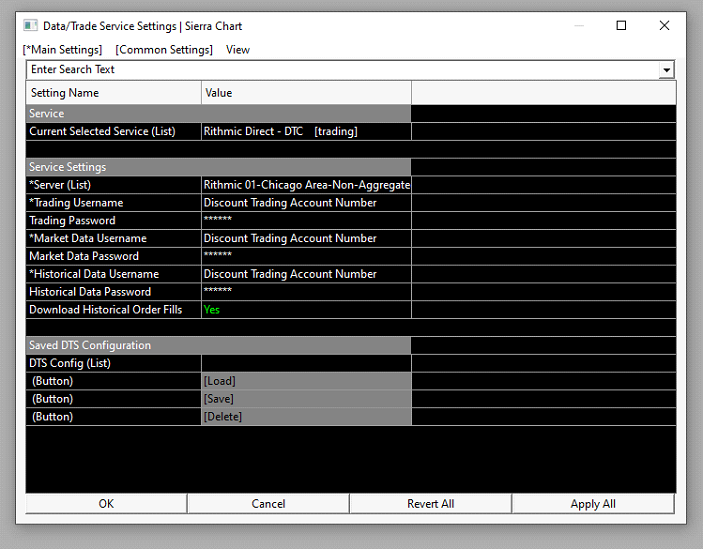
In Service Setting, enter your Rithmic trading account username and password (supplied by Discount Trading). These are case sensitive.
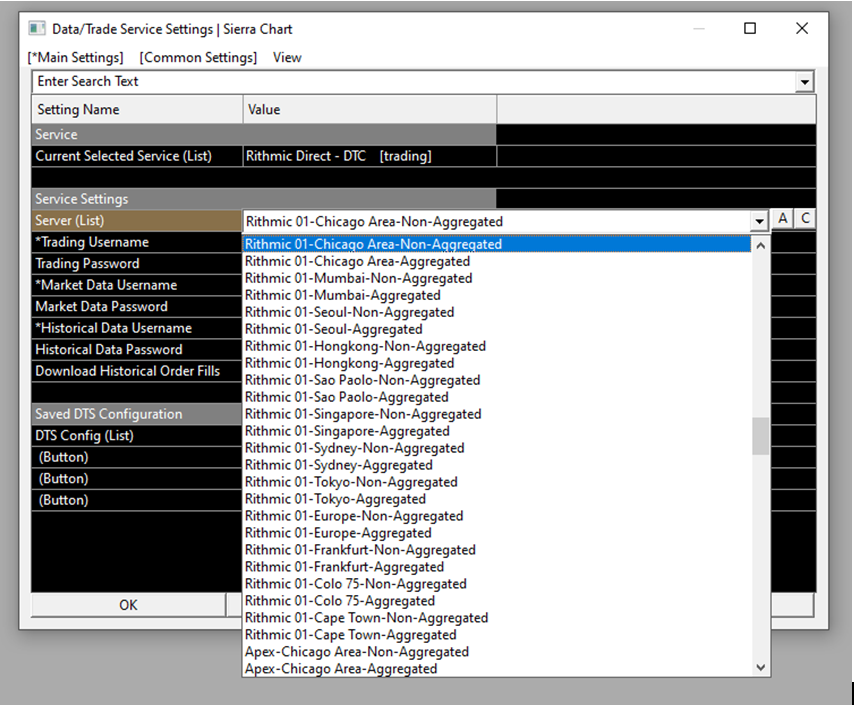
Under Server (List), use the dropdown to select the Rithmic 01 connection closest to where you reside. Then click OK.
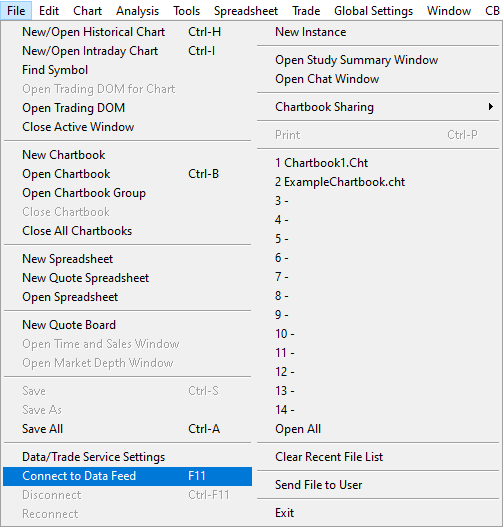
To connect to the data and trading server, select File then Connect to Data Feed on the menu.
The top left corner will turn green for a successful connection.

If a Message Log with errors opens, select File and click Disconnect to prevent further connection attempts. Review the setup steps above carefully. If needed, contact Discount Trading - we will work with Rithmic to resolve the issue.
Please provide Discount Trading with your Sierra Chart username. This can be found on the Sierra Chart login screen and in your Sierra Chart web login. We will activate your connection via Teton order routing.

Go into the Sierra Chart trading program. Select Global Settings, then select Data/Trade Service Settings on the menu.
In the Current Selected Service dropdown, select Teton CME Order Routing (trading).
In the Clearing Firm dropdown, select IronBeam. Click OK.

Select File then Connect to Data Feed on the menu.

The top left corner will turn green for a successful connection.

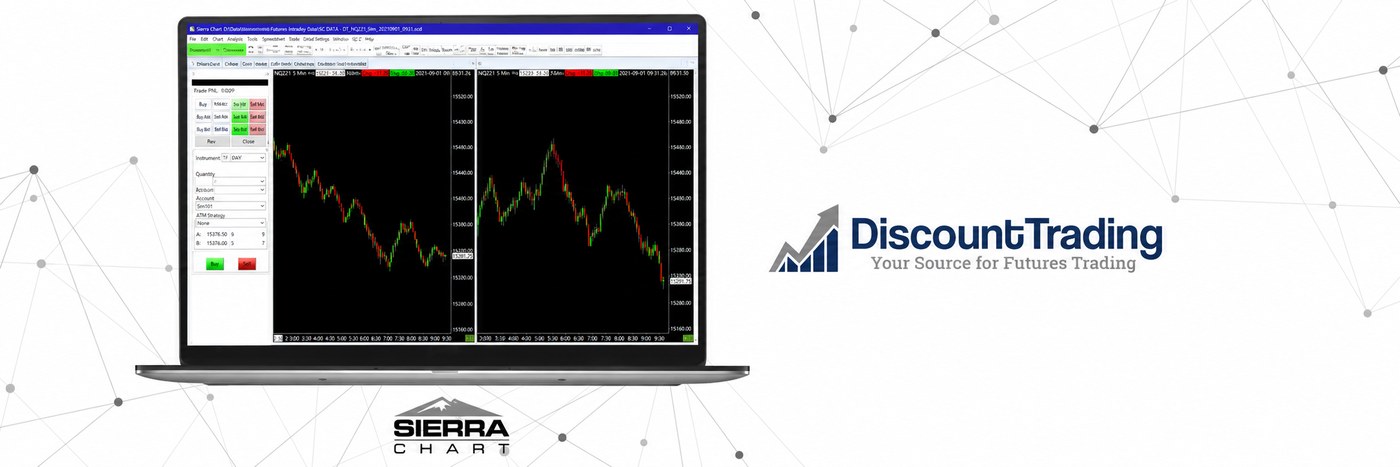
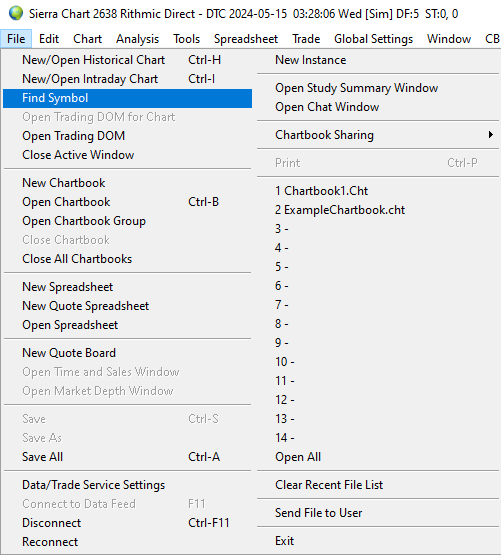
To open a Historical Chart, an Intraday Chart or a Trading DOM, select File and Find Symbol on the menu. Locate the symbol you want in the list and press the button.
Sierra Chart accepts many different order types including: Market, Limit, Stop, Stop-Limit, Market Limit, Market If Touched, Limit Chase, Trailing Stop, Trailing Stop-Limit, OCO Limit and Stop, OCO Buy Stop Sell Stop, and many more. All orders may not be available on all markets.
Create Historical charts with a bar period of Daily, Weekly, Monthly, Quarterly, Yearly, or any number of days. Historical data is automatically downloaded from supported services and saved locally. Historical charts are updated in real time so you always have a chart up to date with the latest trade.
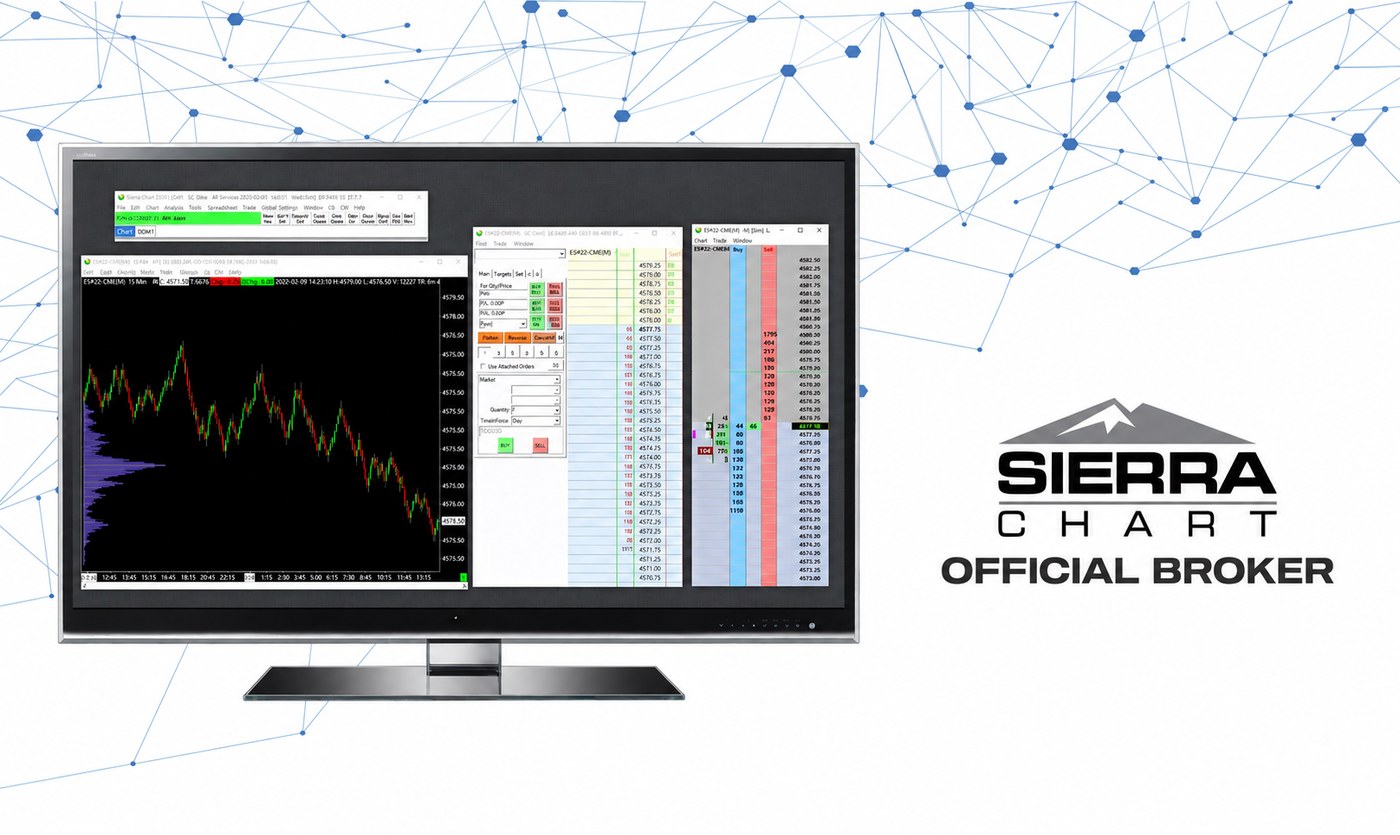
Two or more charts and Trade DOMs within a Chartbook can be linked together. Chart linking allows you to maintain various settings among a group of charts that share the same Link Number. Access via Chart Settings >> Advanced Settings 2.
For each chart you want to link, set the same nonzero Link Number. Sierra Chart will use this number to link them together. The following Chart Linking types are available:
For most futures traders, Package 11 is the right starting point. It includes everything in Package 10 (charting, indicators, all data feeds, full order routing) plus the TPO Chart Study, Number Bars, Volume Profile Interactive Drawing Tool, and Market Depth Historical Graph — tools that most active futures traders rely on. Step up to Package 12 only if you need Market by Order (MBO) data, which adds another layer of order book detail. Package 10 is fine if you trade off basic charts and don’t use profile tools.
Yes — the Sierra Chart software fee is separate from exchange data fees. Each exchange (CME, CBOT, NYMEX, COMEX, etc.) charges its own monthly data fee for the markets you subscribe to. If you route through Rithmic or Teton, the data feed comes through that connection and the fees are billed accordingly. Contact a Discount Trading representative for current data fee tiers for the markets you plan to trade.
Yes. Sierra Chart offers a free trial directly through their website. You can connect that trial to a Discount Trading demo account routed through Rithmic, Teton, or CQG to test the full platform before committing. Request a demo through our form below and we’ll walk you through the connection setup.
Sierra Chart is Windows-only natively. Mac users typically run it through Parallels Desktop, VMware Fusion, or a Windows VPS. Sierra Chart also runs through their browser-based mobile/web interface for monitoring and basic order entry, but the full desktop platform requires Windows. If you’re on Mac and want to evaluate the platform, the web/mobile interface gives you a feel for the workflow without a Windows setup.
Teton is often the first recommendation for new Sierra Chart accounts — no routing fees, direct CME connectivity, and includes mobile/web trading. Rithmic is preferred by active traders who want low-latency execution (servers co-located at CME Aurora), R|Trader Pro included free as a backup platform, and compatibility with 18+ other platforms. CQG works well if you’re already running other CQG products. All three offer low day-trading margins for futures. During account setup we’ll help you pick the right one for your trading style.
Yes — Sierra Chart supports multiple instances on the same machine. Each instance can connect to a different account or data source if needed. This is common for traders who want separate workspaces for different markets or strategies, or for running a live account and a sim account side by side.
Once your live Discount Trading account is funded, Sierra Chart setup typically takes 15–30 minutes. You’ll download Sierra Chart from sierrachart.com, install your package, enter the credentials we provide for your chosen routing (Rithmic, Teton, or CQG), and configure your symbol settings. The connection walkthroughs further up this page cover the exact steps. If you get stuck, give us a call during business hours and we’ll walk you through it.
Yes. Sierra Chart supports automated trading through its spreadsheet-based trading systems and its Advanced Custom Study Interface and Language (ACSIL), which lets you build custom studies and automated systems in C++. You can also trigger entries and exits from alerts and study conditions. Automated systems run on your own machine while Sierra Chart is connected through your Discount Trading routing.
Sierra Chart offers a free trial, but the live platform is a paid monthly subscription billed by Sierra Chart, not by Discount Trading. You choose Package 10, 11, or 12 depending on the tools you need. Exchange data fees and Discount Trading commissions are separate. We can walk through what the total monthly cost looks like for the markets you plan to trade.
Through Discount Trading, Sierra Chart gives you access to futures across the major U.S. exchanges — CME, CBOT, NYMEX, and COMEX — plus ICE. That covers equity index, energy, metal, grain, interest rate, and currency futures, among others. The specific markets you can pull up depend on the exchange data subscriptions you choose and your routing.
Open your Discount Trading account today and get started with Sierra Chart - official broker, low margins, full routing support.
Open Account Now
Fill out the form below and we'll get you set up with a Sierra Chart demo today.


