


Quantower is a modern futures trading platform with footprint charts and advanced order flow tools in a customizable, multi-monitor workspace. Connect it to Discount Trading for low intra-day margins and reliable order routing.
Quantower gives futures traders a modern, flexible workspace with full DOM trading, depth-of-market visualization, and clean order management. Pair it with Rithmic routing, low intra-day margins, and competitive commissions through Discount Trading for a complete futures trading setup.
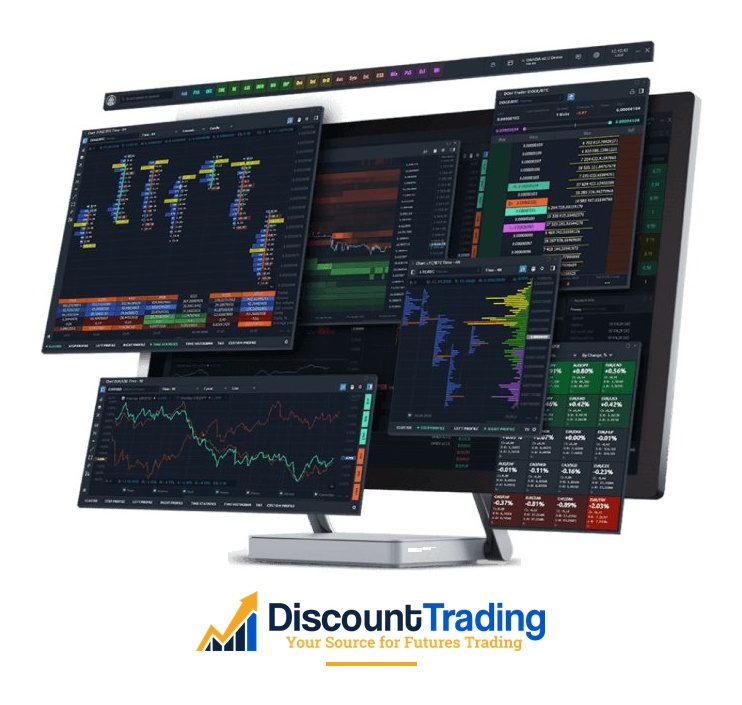
Quantower is a desktop trading platform built around a modular workspace concept. Every panel — chart, DOM, footprint, volume profile, watchlist, order entry — is a self-contained window you can resize, drag, group, or split across multiple monitors. Instead of working inside a fixed layout, traders build their own setup and save it as a template.
The platform was launched in 2018 and has steadily gained traction with futures traders who need serious order flow tools without the bloat of older platforms. It runs cleanly even on modest hardware, with frequent updates from a development team that pushes new features and fixes regularly.
| Feature | What It Does |
|---|---|
| Modular Workspace | Drag, group, and split panels across monitors. Save layouts as reusable templates. |
| Footprint Charts | Bid and ask volume at every price level inside each candle, with imbalance highlighting. |
| DOM Surface | Heatmap-style visualization of resting orders to read liquidity changes in real time. |
| Advanced DOM Trading | Mouse trading mode, hot keys, OCO orders, and a price ladder built for fast execution. |
| Volume Profile & TPO | Standard and tabular volume profile views, plus Time Price Opportunity charting. |
| Synthetic Instruments | Build multi-leg synthetic symbols and chart them as a single instrument for spread trading. |
| Time & Sales | Real-time and historical tape with filtering for reading aggressive activity. |
| Market Replay | Play back historical tick data for strategy testing and post-market review. |
| Trading Simulator | Practice with simulated fills before risking capital on a live account. |
Quantower includes hundreds of built-in indicators alongside the volume and order flow tools. For traders who code, the Quantower Algo development environment supports C# for building custom indicators and strategies — either from scratch or by porting code from other platforms.
The pricing model is unusually flexible. There’s a free version that covers the basics, monthly and annual subscription packages for the full feature set, and a one-time Lifetime license for traders who’d rather pay once and own the platform outright. Specific feature add-ons can also be purchased separately.
Support comes from Quantower’s in-app help, online documentation, and an active Telegram community channel where users and developers exchange tips and feature requests.
Through Discount Trading, you trade futures with Quantower routed via Rithmic. That covers the major U.S. futures exchanges — CME (E-minis, Micro E-minis, currencies, livestock, dairy, and CME Bitcoin and Ether futures), CBOT (grains, Treasuries, SOFR), NYMEX (crude oil, natural gas, refined products), and COMEX (gold, silver, copper).
Order flow is where Quantower stands out. The platform brings together footprint charts, DOM Surface, Volume Profile, TPO charting, and the Power Trades scanner in one unified workspace — giving traders a detailed view of where volume is going through, where liquidity is sitting, and where aggressive activity is concentrated. The cards below break down the main order flow components and the wider platform toolkit.

Footprint charts show the bid and ask volume traded at every price level within each candle. Quantower lets you set imbalance ratios that highlight where one side’s aggression overwhelmed the other, filter by minimum volume, and overlay delta directly on the chart. The result is a clearer picture of absorption, initiative, and exhaustion than what a traditional candlestick chart can show.
The TPO chart visualizes price distribution over a session, identifying the Point of Control (the price level where the most volume traded), the Value Area (where roughly 70% of activity occurred), and Single Prints that can act as support or resistance. This is the same Market Profile concept used by professional auction-theory traders. The default unit is a 30-minute period per letter, but you can change it to Minute, Hour, or Day. Display is configurable as BOXES or LETTERS, and Quantower offers 10 color modes — Single Color, Up/Down Profile, Up/Down Bars, Heatmap, Delta Profile, Delta Price, Delta Bars, Volume Profile, Volume Price, and Volume Bars.
DOM Surface is a heatmap of the order book. Resting limit orders show up by size and color so you can see where liquidity is stacking up, where it’s being pulled, and how the book is shifting in real time. Color modes can be tuned to highlight imbalances and high-volume levels at a glance.
Power Trades scans for zones where a high volume of orders executed in a very short time — the kind of short-term imbalance that often precedes a price move. You can set filters for total volume, time interval, basis volume ratio, delta, and tick range, with alerts as visual indicators or sound notifications, applied to charts or DOMs.
Beyond order flow, Quantower includes 40+ trading and analytical windows. Each window is independent — you can break it out to another monitor, minimize it, or save it as part of a workspace template. Hundreds of built-in indicators are available, and custom indicators can be added through the C# script API.
Trade directly from the chart, the DOM, or a dedicated order entry panel. Quantower supports market, stop, limit, and stop-limit orders, plus OCO (one-cancels-other) brackets, time-in-force options (GTC, GTD, IOC, FOK, Day), and scheduled orders that fire at a specified time. The Copy Trading feature lets you mirror trades across multiple accounts simultaneously.
Quantower handles options on futures with a dedicated option chain panel that includes Greeks (Delta, Gamma, Vega, Theta, Rho), strategy templates, and risk-profile analysis. The Rollover submenu helps you move positions when a contract nears expiration — the platform automatically switches to the new contract while preserving your drawings and settings.
Quantower has an in-app education center, online documentation that covers everything from getting started to advanced customization, and a Telegram community channel where users and the development team are active. If you need direct help, Quantower support is reachable through their website.
For traders who code, Quantower exposes a C# SDK for writing custom indicators, strategies, and panels. Strategies can be backtested against historical data and run live against your account through the built-in Strategy Runner.
The SDK and API are openly documented, and Quantower has an active third-party developer community publishing indicators and tools. If you have an existing rule-based approach you want to automate, this is a stronger area of the platform than many competitors.
One of Quantower’s defining traits is that it’s broker-neutral — the platform isn’t locked to a single data source. It can hold simultaneous connections to multiple brokers and market-data providers, with 60+ connections supported in total. At Discount Trading your live futures routing runs through Rithmic, and you can attach additional market-data feeds alongside it without disturbing that trading connection.
That modular design enables things most platforms can’t. You can build synthetic symbols that combine instruments into a single chart — a custom spread, a ratio, or a continuous contract stitched across expirations — and study them with the same order-flow tools you’d use on any market. You can compare the same contract across two data sources side by side. And because each connection is independent, adding or swapping a feed is a settings change rather than a reinstall.
Quantower is built around workspaces — fully customizable layouts you arrange once and save. Charts, DOMs, watchlists, the order book, and analytics windows each float independently, so you can spread a setup across several monitors and keep everything in view at once. The platform handles multi-screen rigs without the lag that bogs down lighter software.
The windows aren’t just placed next to each other — they can be linked. Change the symbol on a linked chart and your DOM, Time & Sales, and order-entry panel follow automatically, so switching markets is one click instead of reconfiguring five windows. Save a different workspace for each routine — one for the morning session, another for a specific market, a sim layout for testing — and load whichever fits what you’re doing that day.
Quantower offers a free version, paid monthly and annual subscriptions, and a one-time Lifetime license. Discount Trading covers the cost of the Premium features for qualifying high-volume traders — reach out to customer service to see if you qualify.
Includes many advanced features (Chart Trading, Tick Charts, Time-based Charts, Drawing tools and indicators, DOM, Heatmap Panel, History Exporter, Strategy Runner, Copy Trading, and more). Great for those that do not need a lot of bells and whistles, while still getting a lot for FREE.
Subscription packages that range from monthly to annual (30% discount). Quantower rewards long-term commitment with a Lifetime option. Choose the subscription package that works for you or lock in a one-time Lifetime rate.
Per month
Save 20%
Save 30%
One-time payment
Quantower runs on the desktop — that's where the order flow analysis and full feature set live. For trading on the go, Discount Trading clients on Rithmic also get access to Rithmic Mobile and web trading at no additional cost. Place orders, monitor positions, or check the DOM from any phone or browser when you’re away from your trading desk.


We route Quantower through Rithmic and have set up the connection countless times. We know the packages, the order-flow tools, and the quirks of getting the platform talking to your account.
We’ll get you a Quantower demo with simulated trading and live market data so you can test the order-flow tools on real markets before going live.
$0.49 or less per contract commission on standard futures and $0.20 or less per contract commission on micro index futuresiExchange, clearing, and regulatory fees apply..
You can get a person on the line during U.S. and Globex hours for account questions, platform connection issues, or to place a trade if something on your end drops.
Your Quantower orders route through Rithmic’s co-located servers at CME Aurora for fast, reliable execution, with R|Trader Pro available free as a backup platform.
If Quantower isn’t the right fit, we support 20+ other futures platforms. Switching is easy, and you don’t change brokers to do it.
Yes. The free version covers charting, the DOM, and basic order management. The Pro version unlocks the order flow tools (footprint, cluster analysis, volume profile), the Strategy Runner, additional chart types, and more workspace flexibility.
Rithmic. Discount Trading is a Quantower partner specifically on the Rithmic routing connection — that gets you co-located server execution and access to the standard day-trading margins for Discount Trading clients.
All major U.S. futures exchanges through Rithmic — CME, CBOT, NYMEX, and COMEX.
Yes. Quantower is cross-platform — Windows, macOS, iOS, and Android. The mobile app gives you charts, the DOM, and order management when you are away from your trading desk.
Yes. Exchange market data fees are billed separately by the exchange (CME Group, etc.) based on which feeds you subscribe to. This is standard across every futures platform.
Yes. Quantower includes a Strategy Runner and a C# SDK for writing your own indicators and trading strategies. Backtesting against historical data is built in.
Yes. Quantower includes simulated trading so you can test the platform, indicators, or a strategy before going live.
Open a Discount Trading account, download Quantower, and log in with the Rithmic credentials we provide. Open the platform, load the workspace you want, and you are trading.
Open a Discount Trading account, connect Quantower through Rithmic, and start trading futures with a serious order flow platform behind you.
Open Account NowFill out the form and a Discount Trading representative will set you up with a Quantower demo — simulated trading on live market data so you can put the order-flow tools to work before going live. We’ll also help with package selection and Rithmic routing. After you submit, you can download Quantower right away.


